GCP Advanced Terraform Interactive Learning Challenge
Introduction
- terraform
- gcp
Introduction
Welcome to my GCP Advanced Terraform Interactive Learning Challenge repository. Inspired by Erol Kavas’s initiative, which can be explored at Advanced Terraform Interactive Learning Challenge by Erol Kavas
You can see my 👉🏻 PROJECT REPOSITORY
Challenge Overview
The challenge focuses on three core objectives:
- Deploy a robust web application infrastructure using Terraform, leveraging GCP services for a comprehensive and functional architecture.
- Implement security best practices through GCP’s security features, including VPCs, security groups, and IAM roles, to protect the application from unauthorized access.
- Ensure scalability and high availability by utilizing auto-scaling for web servers and employing managed database services, ensuring the application can handle load changes and maintain uptime.
Key steps involve preparing the environment, building a secure network foundation, configuring the web and database tiers with security and scalability in mind, and setting up auto-scaling to dynamically adjust resources.
This challenge is not just about deploying infrastructure; it’s about mastering real-world cloud architecture principles to create resilient, efficient, and secure applications on GCP.
Prerequisites
- Terraform installation
- GCP account set up
Architecture Diagram
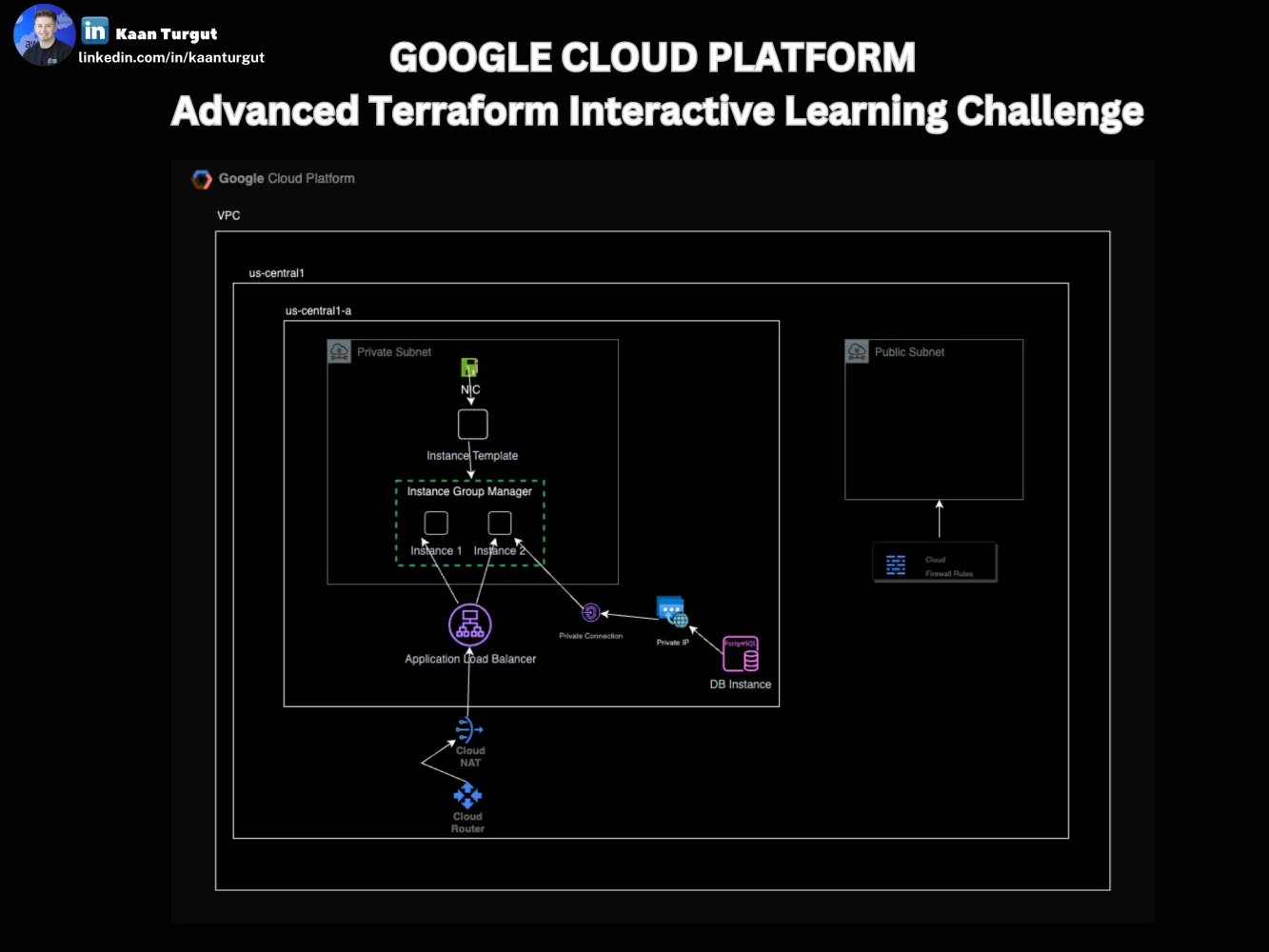
Note: I utilized MODULE approach which is best practice to follow reuseable, more secure and compliant code base. Please see the values for the modules in the .tfvars file.
Project/Terraform Configuration Guide
Project Creation:
You can either create your project from GCP UI or with the following Terraform code:
GCP-Advanced-Terraform-Interactive-Learning-Challenge/project-management-terraform/project.tf Lines 8 to 15 in
# Creates a GCP Project module "KaanT_GCP_Project" {
source = "../modules/project"
name= var.KaanT_GCP_Project.name
project_id= lowercase(var.KaanT_GCP_Project.name)
billing_account= data.google_billing_account.account.id
labels= var.KaanT_GCP_Project.labels
}
Service Account Creation
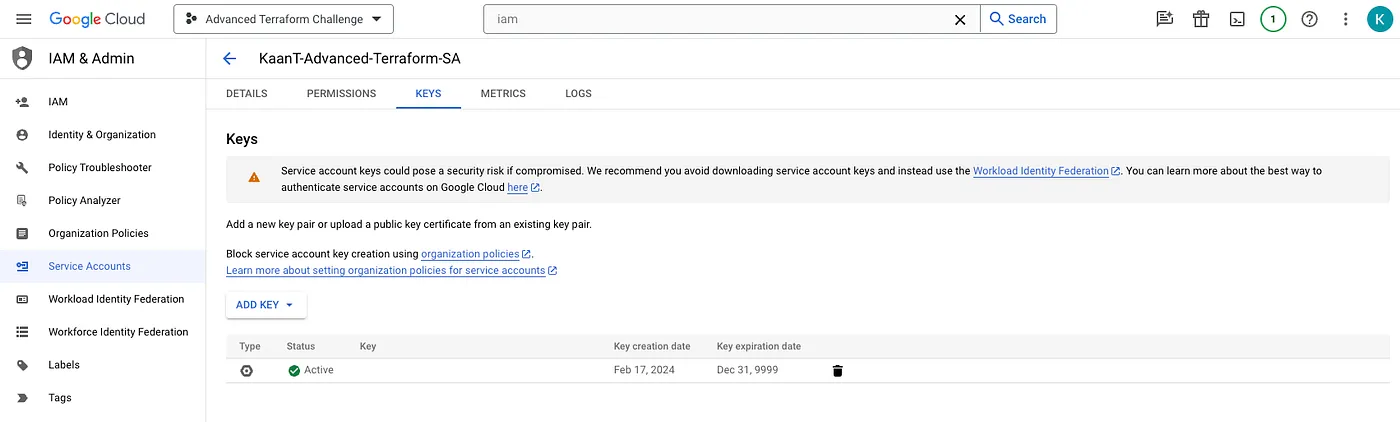
It’s good to use Service Account for the operations. To create the Service Account:
- Go under IAM & Admin and create a Service account.
- Go to KEY tab and create a new one to use in your Terraform config.
Enable needed APIs (resources to use in the project)
- Enable services in newly created GCP Project with the following code:GCP-Advanced-Terraform-Interactive-Learning-Challenge/project-management-terraform/project.tf Lines 17 to 24
# Enable services in newly created GCP Project.
resource "google_project_service" "gcp_services" {
count = length(var.gcp_service_list)
project = google_project.KaanT_GCP_Project.project_id
service = var.gcp_service_list[count.index] disable_dependent_services = true
}- See the tfvars file for the values :GCP-Advanced-Terraform-Interactive-Learning-Challenge/project-management-terraform/project.tfvars Lines 9 to 17
gcp_service_list= [
 "compute.googleapis.com", # Compute Engine API "sqladmin.googleapis.com", # Cloud SQL Admin API "iam.googleapis.com", # Identity and Access Management (IAM) API "servicenetworking.googleapis.com", # Service Networking API "cloudresourcemanager.googleapis.com", # Cloud Resource Manager API "oslogin.googleapis.com", # Cloud OS Login API "iamcredentials.googleapis.com", # IAM Service Account Credentials API
]
Create a Bucket to store STATEFILE remotyl and more secure
- Create a bucket with the following code:GCP-Advanced-Terraform-Interactive-Learning-Challenge/project-management-terraform/project.tf Lines 26 to 33
# Creates a GCS bucket to store tfstate. module "KaanT_Project_TFSTATE_Bucket" {
source = "../modules/storage_bucket"
name= var.KaanT_Project_TFSTATE_Bucket.name
location= var.KaanT_Project_TFSTATE_Bucket.location
project = module.KaanT_GCP_Project.id
}
Provider Configuration
- Once the previous steps are done, you can configure your provider.tf as the following : provider.tf
- Make sure you give the right path for your credentials file in this code snippet:GCP-Advanced-Terraform-Interactive-Learning-Challenge/provider.tf Lines 18 to 19
provider "google" { credentials = file("pat_to_your_credentials_file")Note: Google-beta provider si needed for couple resources in the project.
Network Foundation
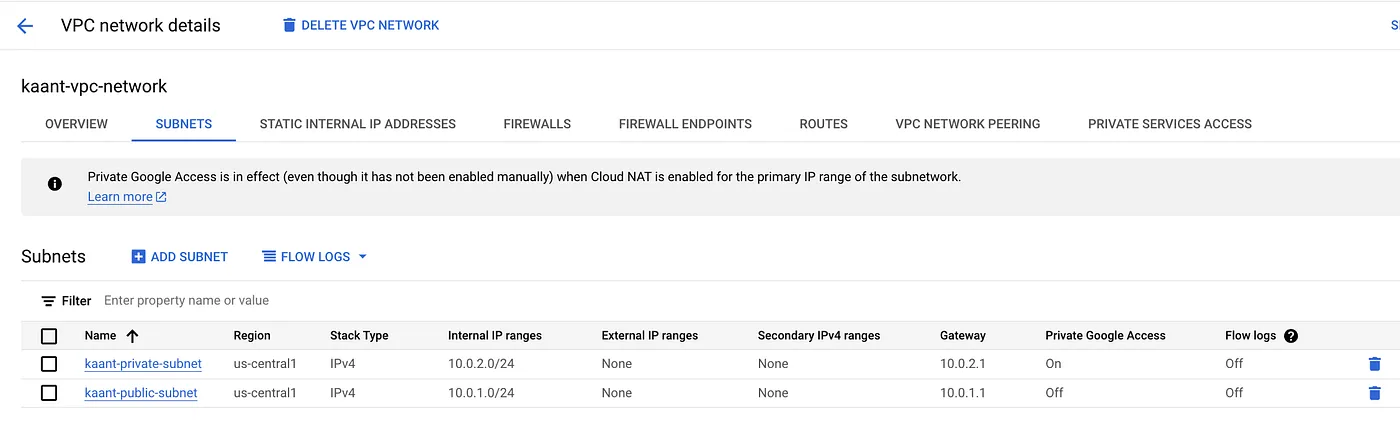
As stated in the challange, we need a VPC, a private and public subnet. Set up an Internet Gateway for public subnet access and NAT Gateways for private subnet access.
I created a VPC with:
- 1 public subnet:For internet access to Public Subnet, I used Firewall with HTTP and HTTPS traffic allowed.GCP-Advanced-Terraform-Interactive-Learning-Challenge/project.tfvars Lines 19 to 27
/// *** Firewall for Public Subnet *** \\\
 KaanT_Firewall = {
name = "kaant-firewall"
allow = { protocol = "tcp"
ports = ["80", "443"] }
source_ranges = ["0.0.0.0/0"]
}- 1 private subnet:NAT Gateway for the private subnet, I used compute_router and compute_router_natGCP-Advanced-Terraform-Interactive-Learning-Challenge/project.tfvars Lines 29 to 62
/// *** Private Subnet *** \\\
 KaanT_Private_Subnet = {
   name                     = "kaant-private-subnet"
   region                   = "us-central1"
   ip_cidr_range            = "10.0.2.0/24"
   purpose                  = "PRIVATE"
   private_ip_google_access = true
 }

 /// *** Router connected to VPC *** \\\
 KaanT_Router = {
   name                          = "kaant-router"
   encrypted_interconnect_router = true
   bgp = {
     advertise_mode     = "DEFAULT"
     asn                = 64514
     keepalive_interval = 20
   }
 }

 /// *** Router NAT for Private Subnet *** \\\
 KaanT_Router_NAT = {
   name                               = "kaant-router-nat"
   nat_ip_allocate_option             = "AUTO_ONLY"
   source_subnetwork_ip_ranges_to_nat = "LIST_OF_SUBNETWORKS"
   subnetwork = {
     name                    = "kaant-private-subnet"
     source_ip_ranges_to_nat = ["ALL_IP_RANGES"]
   }
   log_config = {
     enable = true
     filter = "ERRORS_ONLY"
   }
 }
Security Measures
As stated in the challange, Use IAM roles for secure CLOUD service interactions without hard-coded credentials.
I used IAM Policies to give the necessary permission for the service account:
GCP-Advanced-Terraform-Interactive-Learning-Challenge/project-management-terraform/aim_roles.tf
Lines 1 to 32
/// *** Existing Users data *** \\\
 data "google_iam_policy" "admin" {
   binding {
     role = var.admin_iam.binding.role
     members = var.admin_iam.binding.members

   }
 }

 data "google_iam_policy" "compute_networkAdmin" {
   binding {
     role = var.compute_networkAdmin.binding.role
     members = var.compute_networkAdmin.binding.members

   }
 }

 /// *** IAM OWNER Policy Data *** \\\
 module "KaanT_Project_IAM_Policy" {
     source = "./modules/project_iam_policy"
     project= module.KaanT_GCP_Project.id
     policy_data= data.google_iam_policy.admin.policy_data

 }

 /// *** IAM Network Admin Policy Data *** \\\
 module "KaanT_Project_NetworkAdmin_IAM_Policy" {
     source = "./modules/project_iam_policy"
     project= module.KaanT_GCP_Project.id
     policy_data= data.google_iam_policy.compute_networkAdmin.policy_data

}- See the tfvars details:GCP-Advanced-Terraform-Interactive-Learning-Challenge/project-management-terraform/project.tfvars Lines 19 to 36
KaanT_Project_TFSTATE_Bucket={
     name = "gcp-advanced-project-tfstate-st"
     location = "us-central1"
 }

 admin_iam={
     binding={
         role= "roles/owner",
         members= [ "user:you_service_account_email",]
     }
 }

 compute_networkAdmin={
     binding={
         role= "roles/compute.networkAdmin",
         members= [ "user:you_service_account_email",]
     }
 }
Web Tier Configuration
As stated in the challange: Deploy web servers within an auto-scaling group, ensuring they can handle load spikes and failures gracefully.- Utilize an Application Load Balancer to distribute traffic evenly across your instances.
I used instance templates for a commong instance type:
- Template’s NIC resides in the Private SubnetSee the module values:GCP-Advanced-Terraform-Interactive-Learning-Challenge/project.tfvars Lines 80 to 100
/// *** Instance Template *** \\\
 KaanT_Instance_Template = {
   name = "kaant-instance-template"
   tags = ["foo", "bar"]
   labels = {
     environment = "dev"
   }
   instance_description = "This template is used to create app server instances."
   machine_type         = "e2-medium"
   can_ip_forward       = false
   disk = {
     source_image = "debian-cloud/debian-11"
     auto_delete  = true
     boot         = true

   }
   service_account = {
     scopes = ["cloud-platform"]
   }

 }
I used compute_health_check resource to check the instance health:
- See the module values:GCP-Advanced-Terraform-Interactive-Learning-Challenge/project.tfvars Lines 102 to 113
/// *** Compute Health Check *** \\\
 KaanT_Compute_Health_Check = {
   name                = "kaant-compute-health-check"
   check_interval_sec  = 5
   timeout_sec         = 5
   healthy_threshold   = 2
   unhealthy_threshold = 10
   http_health_check = {
     request_path = "/healthz"
     port         = "80"
   }
 }
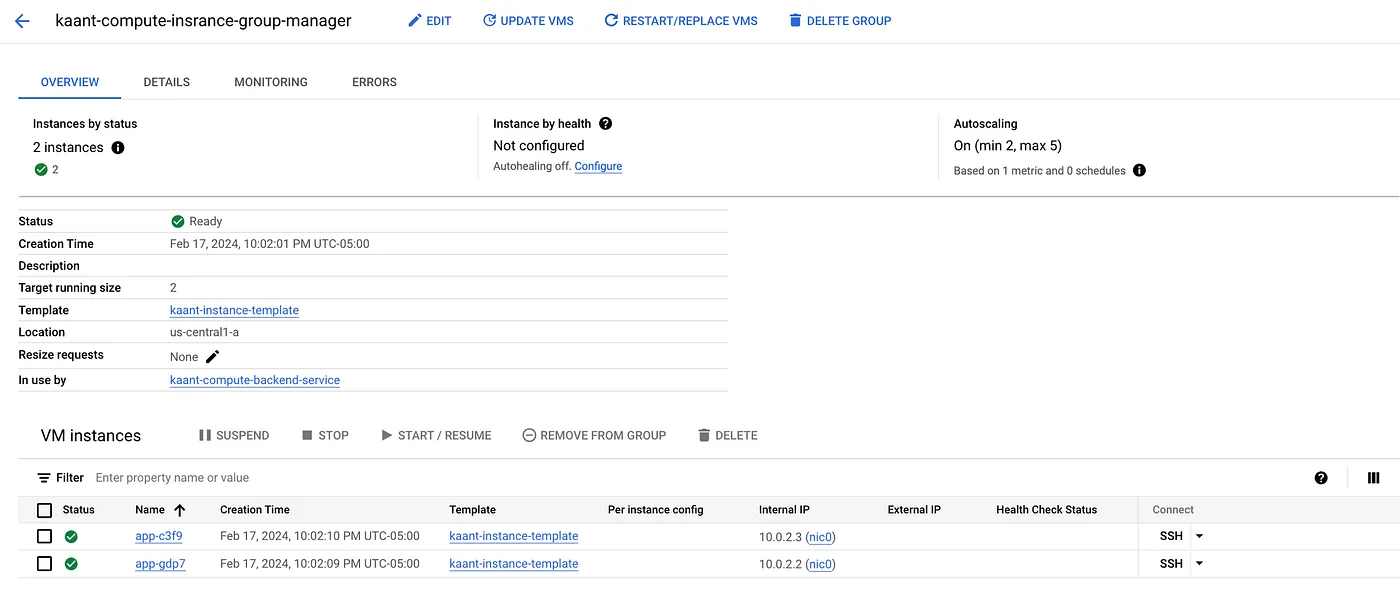
I used compute_instance_group_manager to create and manage pools of Compute Engines
- See the module:GCP-Advanced-Terraform-Interactive-Learning-Challenge/compute.tf Lines 50 to 60
/// *** Compute Instance Group Manager *** \\\
 module "KaanT_Compute_Insrance_Group_Manager" {
   source             = "./modules/compute_instance_group_manager"
   name               =var.KaanT_Compute_Insrance_Group_Manager.name        base_instance_name=var.KaanT_Compute_Insrance_Group_Manager.base_instance_name
   instance_template  = module.KaanT_Instance_Template.id
   zone               = var.KaanT_Compute_Insrance_Group_Manager.zone
   target_size        = var.KaanT_Compute_Insrance_Group_Manager.target_size
   depends_on         = [var.KaanT_Instance_Template]

 }
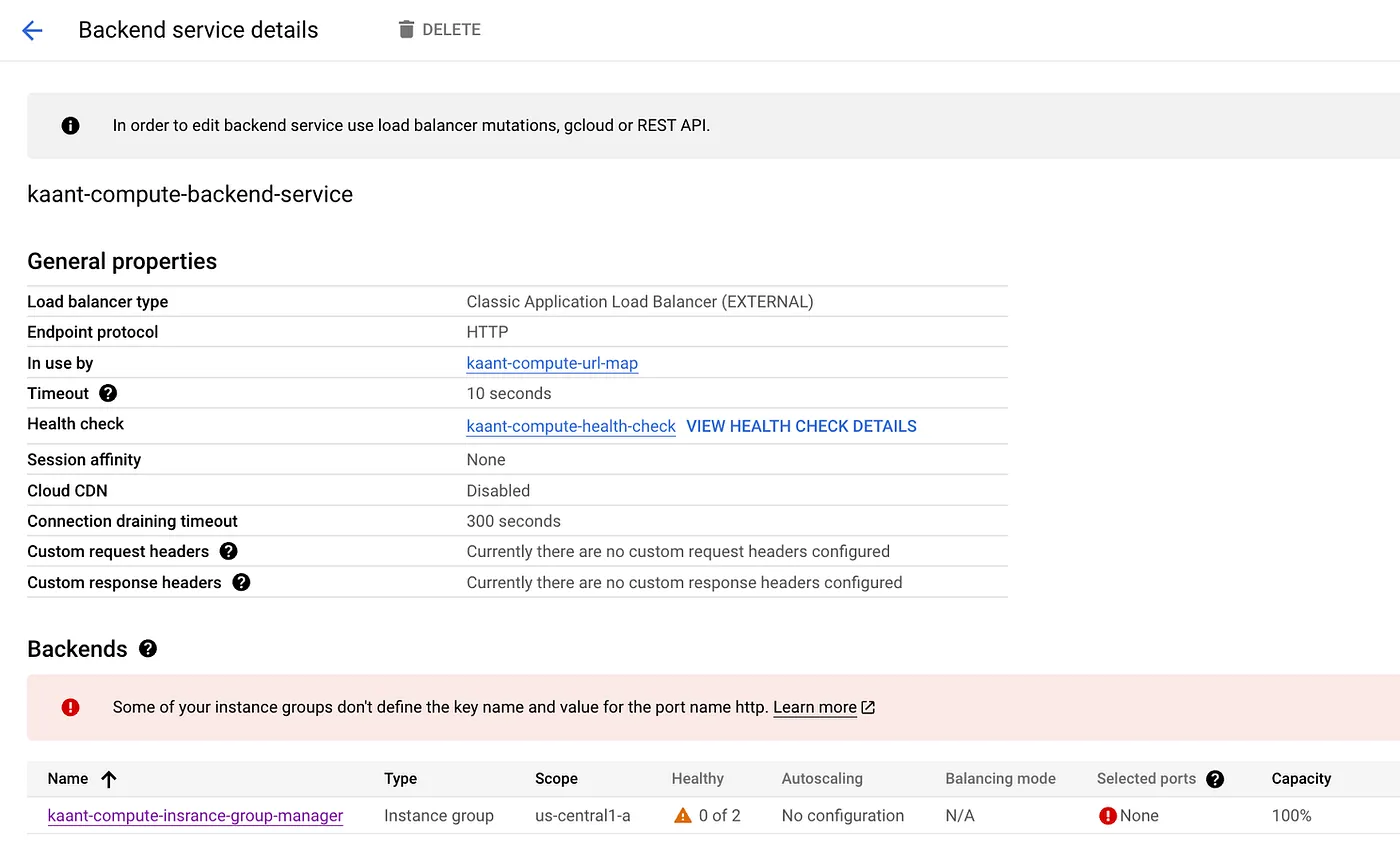
I used compute_backend_service to use as a backend of the Application Load Balancer
- See the module:GCP-Advanced-Terraform-Interactive-Learning-Challenge/compute.tf Lines 62 to 76
/// *** Compute Backend Service *** \\\
 module "KaanT_Compute_Backend_Service" {
   source        = "./modules/compute_backend_service"
   name          = var.KaanT_Compute_Backend_Service.name
   protocol      = var.KaanT_Compute_Backend_Service.protocol
   port_name     = var.KaanT_Compute_Backend_Service.port_name
   timeout_sec   = var.KaanT_Compute_Backend_Service.timeout_sec
   health_checks = [module.KaanT_Compute_Health_Check.id]
   backend = {
     group          = module.KaanT_Compute_Insrance_Group_Manager.instance_group
     balancing_mode = var.KaanT_Compute_Backend_Service.backend.balancing_mode
   }
   depends_on = [module.KaanT_Compute_Health_Check, module.KaanT_Compute_Insrance_Group_Manager]

 }
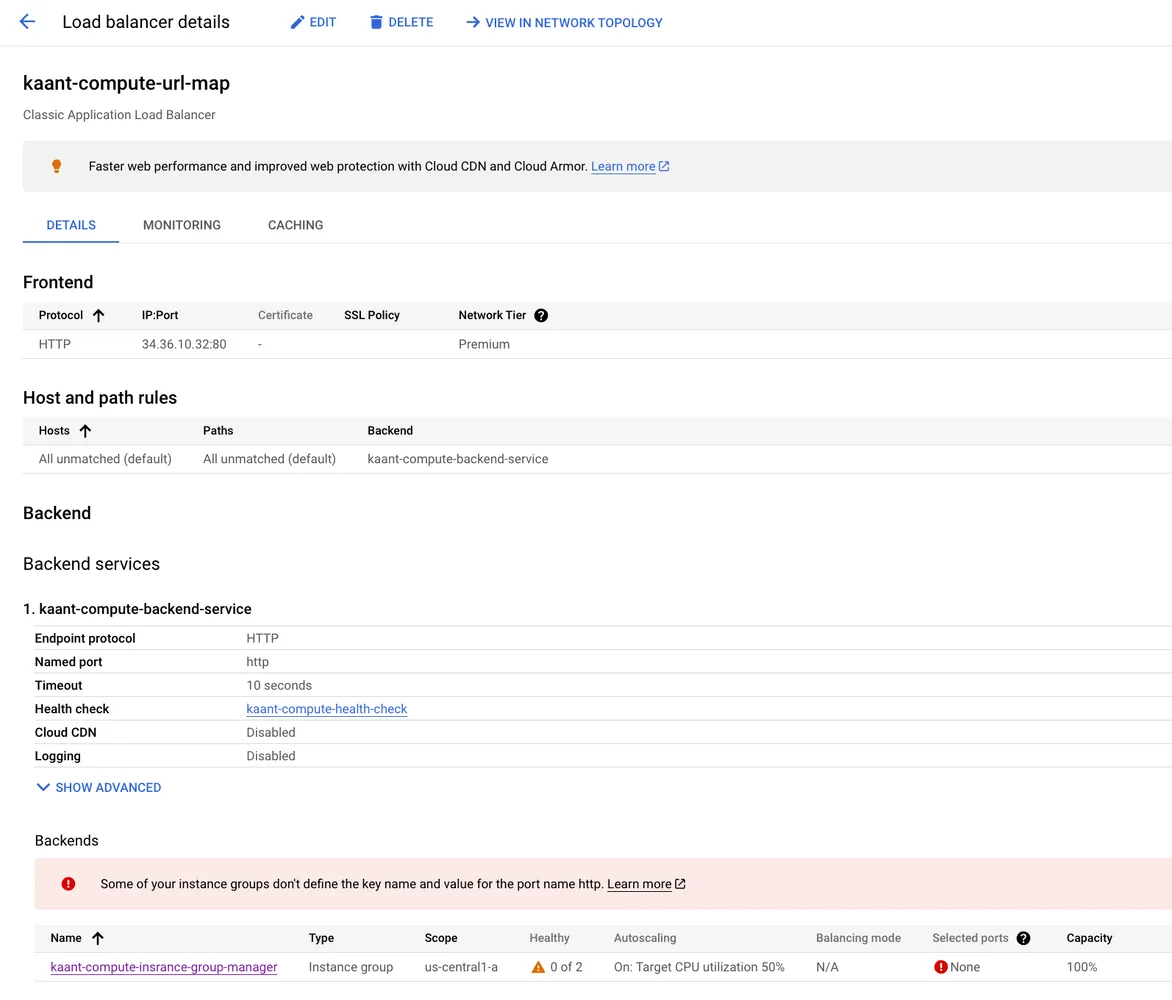
I used compute_url_map which is a URL Map Load Application Balancer
- See the module:GCP-Advanced-Terraform-Interactive-Learning-Challenge/compute.tf Lines 97 to 104
/// *** Compute Url Map *** \\\
 module "KaanT_Compute_Url_Map" {
   source          = "./modules/compute_url_map"
   name            = var.KaanT_Compute_Url_Map.name
   default_service = module.KaanT_Compute_Backend_Service.id
   depends_on      = [module.KaanT_Compute_Backend_Service]

 }
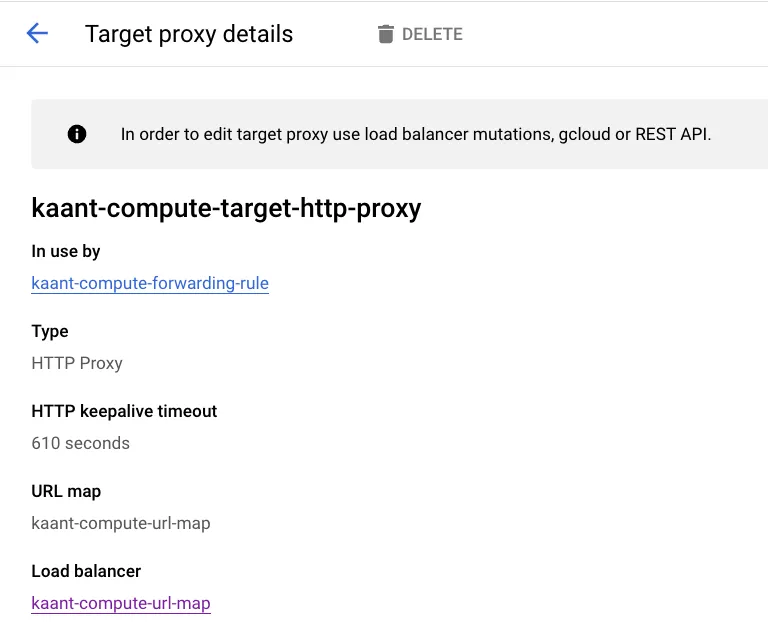
I used compute_target_http_proxy Represents a TargetHttpProxy resource, which is used by one or more global forwarding rule to route incoming HTTP requests to a URL map.
- See the module:GCP-Advanced-Terraform-Interactive-Learning-Challenge/compute.tf Lines 106 to 113
/// *** Compute Targer Http Proxy *** \\\
 module "KaanT_Compute_Target_Http_Proxy" {
   source     = "./modules/compute_target_http_proxy"
   name       = var.KaanT_Compute_Target_Http_Proxy.name
   url_map    = module.KaanT_Compute_Url_Map.id
   depends_on = [module.KaanT_Compute_Url_Map]

 }
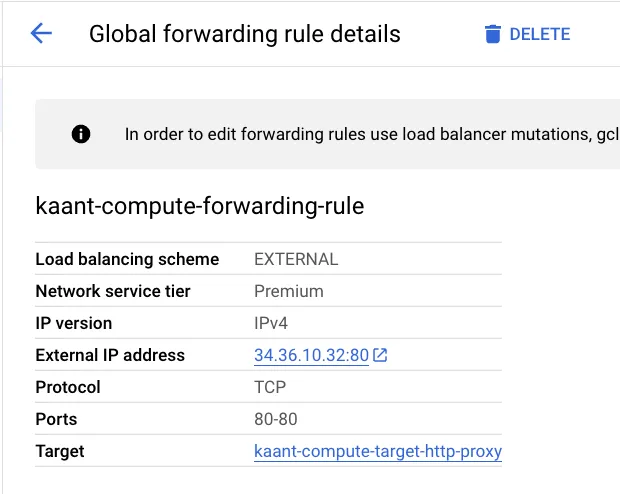
I used compute_global_forwarding_rule : takes a name, the target HTTP proxy, and the range of port numbers this rule will serve for TCP.
- See the module:GCP-Advanced-Terraform-Interactive-Learning-Challenge/compute.tf Lines 115 to 123
/// *** Compute Forwarding Rule *** \\\
 module "KaanT_Compute_Forwarding_Rule" {
   source     = "./modules/compute_global_forwarding_rule"
   name       = var.KaanT_Compute_Forwarding_Rule.name
   target     = module.KaanT_Compute_Target_Http_Proxy.id
   port_range = var.KaanT_Compute_Forwarding_Rule.port_range
   depends_on = [module.KaanT_Compute_Target_Http_Proxy]

 }
Database Deployment:
As stated in the challange: Provision a managed database in a private subnet, accessible only by your application servers.
I used sql_database_instance for managed PostgreSQL 15 type.
- See the module:GCP-Advanced-Terraform-Interactive-Learning-Challenge/database.tf Lines 1 to 18
/// *** SQL Database Instance *** \\\
 module "KaanT_Sql_DB_Instance" {
   source           = "./modules/sql_database_instance"
   name             = var.KaanT_Sql_DB_Instance.name
   database_version = var.KaanT_Sql_DB_Instance.database_version
   region           = module.KaanT_Private_Subnet.region
   depends_on       = [module.KaanT_Service_Networking_Connection]
   settings = {
     tier                        = var.KaanT_Sql_DB_Instance.settings.tier
     deletion_protection_enabled = var.KaanT_Sql_DB_Instance.settings.deletion_protection_enabled
     ip_configuration = {
       ipv4_enabled                                  = var.KaanT_Sql_DB_Instance.settings.ip_configuration.ipv4_enabled
       private_network                               = module.KaanT_VPC.id
       enable_private_path_for_google_cloud_services = var.KaanT_Sql_DB_Instance.settings.ip_configuration.enable_private_path_for_google_cloud_services
     }
   }

 }
Implement Auto-Scaling
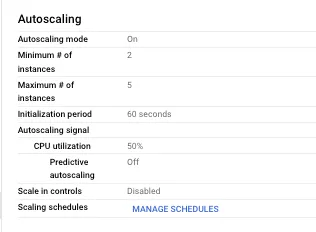
As stated in the challange: Configure auto-scaling policies based on metrics (CPU, memory) to scale your web server fleet up or down automatically.
I used compute_instance_autoscaler to auto-scale the instances based on the thresholds
- See the module:GCP-Advanced-Terraform-Interactive-Learning-Challenge/compute.tf Lines 78 to 95
/// *** Compute Autoscaling *** \\\
 module "KaanT_Compute_Autoscaling" {
   source = "./modules/compute_instance_autoscaler"
   name   = var.KaanT_Compute_Autoscaling.name
   zone   = var.KaanT_Compute_Autoscaling.zone
   target = module.KaanT_Compute_Insrance_Group_Manager.id
   autoscaling_policy = {
     max_replicas    = var.KaanT_Compute_Autoscaling.autoscaling_policy.max_replicas
     min_replicas    = var.KaanT_Compute_Autoscaling.autoscaling_policy.min_replicas
     cooldown_period = var.KaanT_Compute_Autoscaling.autoscaling_policy.cooldown_period

     cpu_utilization = {
       cpu_utilization_target = var.KaanT_Compute_Autoscaling.autoscaling_policy.cpu_utilization.cpu_utilization_target
     }
   }
   depends_on = [module.KaanT_Compute_Insrance_Group_Manager]

 }
Project Process and Reflection
Understanding the Requirements and Resource Planning
The journey began with a deep dive into understanding the specific requirements of deploying a secure and scalable web application on Google Cloud Platform (GCP). Although I was familiar with GCP, identifying the precise resources and their components necessary for this project posed an initial challenge. This step was crucial to ensure that the architecture would not only meet the challenge’s objectives but also adhere to best practices in cloud infrastructure.
Terraform Resource Code Exploration and Module Development
The next step involved an exhaustive exploration of Terraform’s documentation for the required resources. Understanding how each resource needed to be configured and how they interconnect within the cloud environment was both time-consuming and enlightening. This phase was particularly intensive as I decided to write Terraform modules from scratch. The goal here was not just to meet the challenge’s immediate needs but to create reusable components that could simplify future infrastructure as code (IaC) projects. Although this approach demanded a significant investment of time, the outcome was a set of modular, flexible, and reusable Terraform modules that could serve as a foundation for various cloud architectures.
Infrastructure Diagram Creation
Visualizing the architecture was another critical step in the process. Creating an infrastructure diagram took time but was essential for several reasons: it facilitated a better understanding of the overall architecture, helped in identifying potential issues or improvements, and provided a clear reference for both current and future project stakeholders. This diagram serves as a map, guiding the viewer through the complex interconnections of cloud resources that make up the secure and scalable web application.
Challenges Encountered
Accidental Deletion of IAM Policies
One of the most significant challenges I encountered was inadvertently locking myself out of the project by deleting the google_project_iam_policy resource. This mistake was particularly frustrating and time-consuming, leading to a substantial setback.
I was like:

The issue stemmed from following guidance on HashiCorp’s Terraform Registry, which, while helpful, resulted in an unexpected complication. To resolve this, I had to start from scratch by creating a new project and meticulously reconfiguring IAM policies in alignment with HashiCorp’s recommendations. This experience underscored the importance of careful resource management and the potential pitfalls of managing IAM policies through Terraform.
Enabling GCP Resource APIs
Another challenge specific to GCP was the requirement to enable APIs for each resource before it could be managed through Terraform. This step is distinct from my experiences with Azure and AWS, where resource APIs are generally enabled by default or managed differently. Adapting to GCP’s approach required a shift in mindset and an appreciation for the platform’s unique operational model. Despite the initial learning curve, this aspect of GCP’s infrastructure management ultimately added a valuable perspective to my cloud engineering skillset.
Reflections
This project was not just about meeting the challenge’s technical requirements; it was a journey of growth, learning, and adaptation. The process of building from the ground up, facing and overcoming obstacles, and reflecting on these experiences has deepened my understanding of GCP infrastructure and Terraform’s capabilities.