Claude + Codex + Copilot Fixed a Production Bug at 3AM While I Slept | GitHub Agent HQ
It’s 3AM. Your phone buzzes. P0 alert. You fumble for your laptop, VPN in, scroll through logs for 40 minutes, push a fix, and hope you…
- ai-agents
- github-copilot
- devops
It’s 3AM. Your phone buzzes. P0 alert. You fumble for your laptop, VPN in, scroll through logs for 40 minutes, push a fix, and hope you didn’t break something else. By the time you’re back in bed, it’s almost 5AM and your alarm goes off in two hours.
Every on-call engineer knows this story. I got tired of living it.
So I built a system where AI agents handle the entire incident loop, detect, diagnose, fix, review, and deploy, without waking anyone up. I presented it live at GitHub Copilot Dev Days Toronto on April 9 at Microsoft HQ. It worked. In this post, I’m breaking down exactly how.
What is GitHub Agent HQ?
GitHub recently announced Agent HQ, a new way to orchestrate multiple AI agents right inside GitHub. Think of it as a command center where different AI models each play a specific role in your development workflow.
https://github.blog/news-insights/company-news/welcome-home-agents/
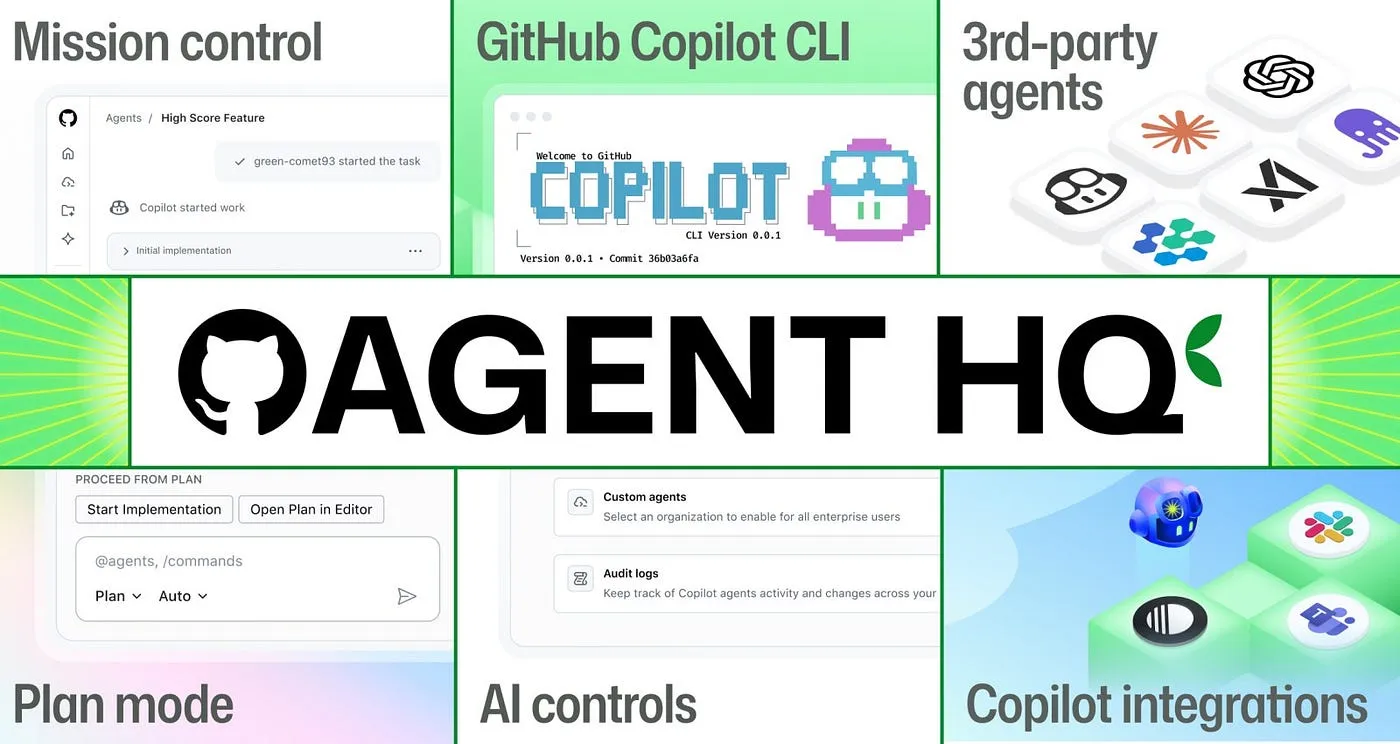
The key insight is that you don’t pick one AI and hope it does everything. You build a team of agents, each with a specialty, and let GitHub coordinate them.
For my project, I’m using three:
Copilot Coding Agent writes the fix. It reads the issue, analyzes the codebase, identifies the bug, and opens a pull request with a patch. Think of it as a developer that never sleeps.
Claude (Code Review) acts as the first reviewer. It scores the PR on consistency, test coverage, HTTP status codes, secrets exposure, and rollback planning. It’s thorough.
Codex (Code Review) provides a second opinion. Running in parallel with Claude, it independently reviews the same PR and checks thresholds, alert logic, and overall code quality.
Two reviewers, two different models, zero humans. If both approve, the PR merges.
The Architecture
Here’s the full stack:
FastAPI on Azure App Service is the “production app.” A simple Python API with a /health endpoint that reports CPU and memory metrics.
Azure Monitor watches the health endpoint. When metrics degrade, it fires an alert.
GitHub Actions Health Monitor is a scheduled workflow that pings the app every few minutes. If the health check returns degraded status, it automatically opens a P0 issue in the repo.
Copilot Coding Agent gets assigned to the P0 issue. It clones the repo, reads the code, finds the root cause, writes the fix, runs tests, and opens a pull request.
Claude + Codex both review the PR in parallel. Each posts a detailed code review comment with pass/fail checks across multiple categories.
CI/CD on push handles the rest. When the PR merges to main, GitHub Actions runs lint, tests, and deploys the fix to Azure App Service.
Terraform defines all the infrastructure. The Azure resource group, App Service, Monitor alerts, everything is code.
The entire flow: detect, diagnose, fix, review, ship. No human in the loop.
How the Incident Loop Works
Let me walk through what actually happens, step by step.
Step 1: Health degrades. The app’s health endpoint starts returning HTTP 503. Maybe it’s a bad deploy, a config change, or in my demo’s case, hardcoded values in health.py instead of real psutil system calls.
Step 2: Monitor catches it. The GitHub Actions health monitor workflow runs on a schedule. It hits the health endpoint, sees the degraded response, and checks if a P0 issue already exists. If not, it creates one.
Step 3: P0 issue auto-created. The workflow opens a GitHub issue titled “P0: Production service degraded, High CPU detected” with full details: HTTP status, CPU/memory values, alert state, and the raw response payload.
Step 4: Copilot gets assigned. The workflow assigns the Copilot coding agent to the issue via the GitHub API. Copilot picks up the task immediately.
Step 5: Copilot diagnoses and fixes. This is the impressive part. Copilot searches the codebase, identifies that health.py has hardcoded values instead of real psutil calls, writes the fix, runs all 7 tests, runs the linter, and opens a PR titled “fix: restore psutil metric sampling in health.py.”
Step 6: Claude reviews. Claude posts a structured code review checking threshold consistency, health logic, HTTP status codes, test coverage, secrets/credentials exposure, and rollback planning. It scores the PR 8/10, passing everything except the rollback plan (which was missing from the PR description, not the code).
Step 7: Codex reviews. Running in parallel, Codex independently reviews the same PR. It checks alert thresholds, code quality, and overall correctness. It addresses the PR comments and confirms the fix is solid.
Step 8: Merge and deploy. With both reviewers approving, the PR merges. The CI/CD pipeline triggers: lint, test, deploy to Azure App Service. The health endpoint returns 200 again.
The app is recovered. Nobody was paged.
What I Learned Building This
Multi-agent review is surprisingly effective. Claude and Codex catch different things. Claude is more structured and checklist-driven. Codex digs deeper into threshold logic and edge cases. Having both creates a review that’s more thorough than either alone.
The health monitor workflow is the glue. Without the scheduled GitHub Actions workflow bridging Azure Monitor to GitHub Issues, none of this triggers. It’s a simple cron job, but it’s the single most important piece.
Copilot’s diagnostic ability is real. It didn’t just blindly patch the file. It searched the codebase, understood that health.py should be using psutil instead of hardcoded values, checked main.py for context, and wrote a targeted fix. That’s not template matching, that’s reasoning.
This isn’t production-ready for everything. For internal tools, staging environments, and low-risk services? Absolutely. For your mission-critical banking API? Not yet. But the trajectory is clear, and it’s moving fast.
Try It Yourself
Everything I showed is open source. The repo has the full stack: FastAPI app, Terraform infrastructure, GitHub Actions workflows, Claude and Codex review templates, and a step-by-step README.
Repo: github.com/hkaanturgut/agent-hq-incident-response
The README walks you through:
- Creating an Azure Service Principal
- Setting up GitHub repo secrets
- Running
terraform applyto provision the infrastructure - Triggering the demo
You can have this running in your own GitHub org in about 30 minutes.
Helpful Links
- GitHub Blog: Welcome Home, Agents — the official announcement covering Agent HQ, mission control, and the open ecosystem for third-party agents
- Official GitHub Agent HQ Intro Video — 90-second overview from GitHub
What’s Next
I’m going to keep building on this. Next up: adding Slack notifications to the pipeline so the morning standup gets a summary of what the agents fixed overnight, and experimenting with multi-repo incident response where a bug in one service triggers fixes across dependent repos.
If you found this useful, give the repo a star and follow me for more agent experiments.
GitHub: @hkaanturgut LinkedIn: in/hkaanturgut X: @hkaanturgut